GestureFlow: Custom Gestures
Gabriel31
-
Mise à jour
2026-11-03
-
Version actuelle
2.1.2
-
Proposée par

La description
Make your Android phone easier to control with gestures you choose.
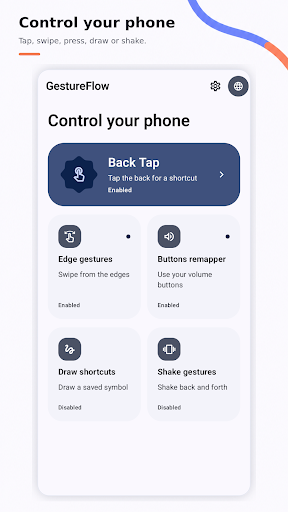
GestureFlow turns back taps, screen-edge swipes, shakes, button presses and drawn symbols into quick actions.
CUSTOMIZE YOUR CONTROLS
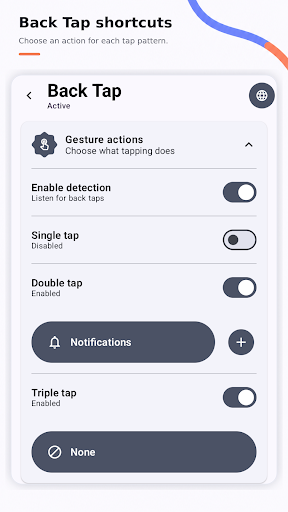
Back tap: Trigger actions with double or triple taps on the back of your phone.
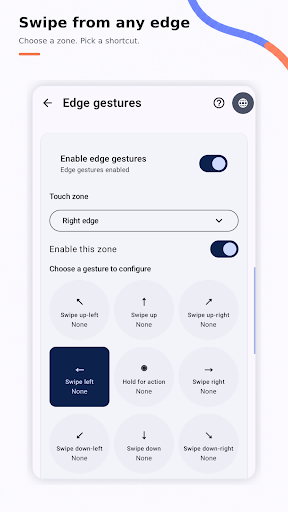
↔ Edge gestures: Assign actions to swipes from the left, right or top edge, then adjust gesture zones and sensitivity.
Shake gestures: Choose actions to trigger when you shake your phone.
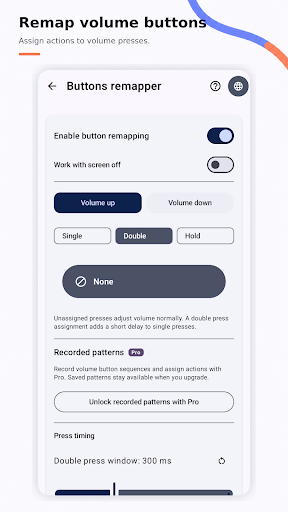
Button remapper: Assign actions to supported hardware button presses.
Draw shortcuts: Draw a saved symbol from a side panel or floating button to open an app or shortcut.
Routines and quick actions: Group useful actions and launch them with a gesture.
Per-app controls: Manage gesture rules for the apps you choose.
Community tuning: Browse or share optional Back Tap tuning profiles.
Choose actions such as Back, Home, Recents, Notifications, Quick Settings, Screenshot, Flashlight, Assistant, or launching an app or shortcut. Available actions depend on your device and permissions.
Adjust sensitivity and gesture zones to make controls feel right for you. Enable only the features you want.
Some features require Android Accessibility access or other system permissions. GestureFlow explains the required access during setup. Some actions may vary by device or Android version.
GestureFlow is an independent app and is not affiliated with Android device manufacturers.
GestureFlow turns back taps, screen-edge swipes, shakes, button presses and drawn symbols into quick actions.
CUSTOMIZE YOUR CONTROLS
Back tap: Trigger actions with double or triple taps on the back of your phone.
↔ Edge gestures: Assign actions to swipes from the left, right or top edge, then adjust gesture zones and sensitivity.
Shake gestures: Choose actions to trigger when you shake your phone.
Button remapper: Assign actions to supported hardware button presses.
Draw shortcuts: Draw a saved symbol from a side panel or floating button to open an app or shortcut.
Routines and quick actions: Group useful actions and launch them with a gesture.
Per-app controls: Manage gesture rules for the apps you choose.
Community tuning: Browse or share optional Back Tap tuning profiles.
Choose actions such as Back, Home, Recents, Notifications, Quick Settings, Screenshot, Flashlight, Assistant, or launching an app or shortcut. Available actions depend on your device and permissions.
Adjust sensitivity and gesture zones to make controls feel right for you. Enable only the features you want.
Some features require Android Accessibility access or other system permissions. GestureFlow explains the required access during setup. Some actions may vary by device or Android version.
GestureFlow is an independent app and is not affiliated with Android device manufacturers.
Afficher plus
OTHERS:TOOLS
Quoi de neuf dans la version 1.3.5
Dernière mise à jour le Nov 03,2026
Corrections de bugs mineurs et améliorations. Installez ou mettez à jour vers la dernière version pour découvrir les nouveautés !
Montrer moin
Captures d’écrans
Renseignements
-
Mise à jour2026-11-03
-
Version actuelle2.1.2
-
Proposée par

-
Taille de l’apk0MB
-
Nécessite AndroidAndroid 4.4+