TMPAD: Game Mode Booster
Osanosa
-
Actualizada
2026-05-07
-
Versión actual
26.05.03
-
Ofrecida por

Descripción
TMPAD (ThemedManager PerAppDownscale) controla la API del Modo Juego de Android para aplicar escalado de resolución, límites de FPS y selección del motor de renderizado por aplicación, reduciendo significativamente la carga de la GPU sin modificar los archivos del juego.
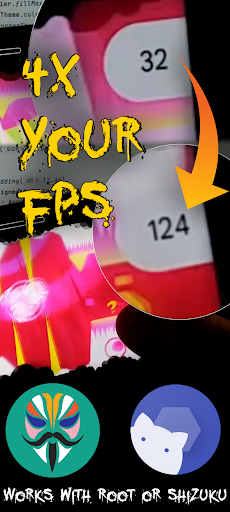
Con un escalado de 0,5x en un dispositivo de 1920 × 1080, el juego se renderiza a 960 × 540 (1/4 de la resolución de píxeles). Los juegos que dependen en gran medida de la GPU pueden experimentar una mejora de hasta 4 veces en los FPS. El escalado se aplica por aplicación y de forma no intrusiva a través de la capa del Modo Juego del sistema.
Características:
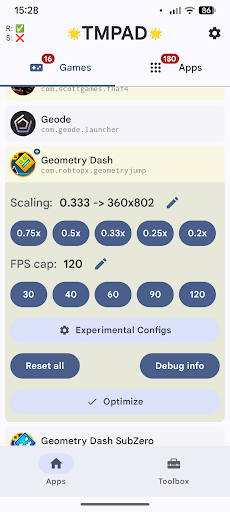
— Factor de reducción de resolución por aplicación
— Límite de FPS por aplicación para control de batería/temperatura
— Anulación del backend gráfico por aplicación (OpenGL ES / Skia+Vulkan)
— Parámetros experimentales del Modo Juego OEM (dependen de la ROM)
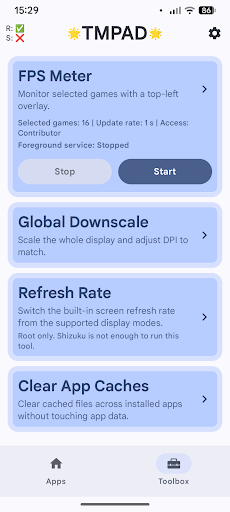
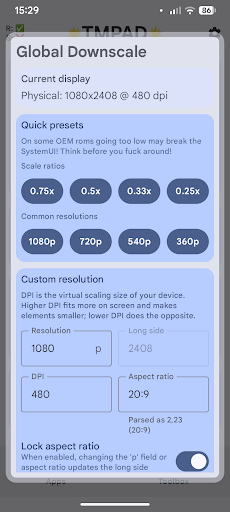
— Reducción global de resolución: anula la resolución de pantalla, DPI y relación de aspecto del sistema
— Superposición de medidor de FPS con CPU, memoria y energía (uso de batería)
— Limpiador de caché (libera espacio de almacenamiento)
— Interruptor de frecuencia de actualización de pantalla (selecciona la frecuencia de actualización que desees)
Cómo funciona:
Utiliza la misma API del Modo Juego que los espacios de juego OEM (Samsung Game Booster, MIUI Game Turbo, etc.). No intercepta, inyecta ni modifica los procesos del juego. No se detecta como una herramienta de trampas.
Requisitos: — Android 13 mínimo / Android 14+ recomendado
— Se requiere Shizuku o acceso root (para permisos elevados de la API del Modo Juego)
— La reducción global de resolución está disponible como alternativa en ROMs donde la API del Modo Juego no funciona o no es compatible.
La compatibilidad varía según la ROM. Las ROMs con Android 14+ similares a la versión original ofrecen la mayor compatibilidad. Hay un modo de funcionamiento alternativo disponible en la configuración para casos excepcionales y parámetros experimentales.
¿No sabes por dónde empezar? Mira este tutorial oficial:
https://www.youtube.com/watch?v=1P4o2uKxpTA&utm_source=playstore
Con un escalado de 0,5x en un dispositivo de 1920 × 1080, el juego se renderiza a 960 × 540 (1/4 de la resolución de píxeles). Los juegos que dependen en gran medida de la GPU pueden experimentar una mejora de hasta 4 veces en los FPS. El escalado se aplica por aplicación y de forma no intrusiva a través de la capa del Modo Juego del sistema.
Características:
— Factor de reducción de resolución por aplicación
— Límite de FPS por aplicación para control de batería/temperatura
— Anulación del backend gráfico por aplicación (OpenGL ES / Skia+Vulkan)
— Parámetros experimentales del Modo Juego OEM (dependen de la ROM)
— Reducción global de resolución: anula la resolución de pantalla, DPI y relación de aspecto del sistema
— Superposición de medidor de FPS con CPU, memoria y energía (uso de batería)
— Limpiador de caché (libera espacio de almacenamiento)
— Interruptor de frecuencia de actualización de pantalla (selecciona la frecuencia de actualización que desees)
Cómo funciona:
Utiliza la misma API del Modo Juego que los espacios de juego OEM (Samsung Game Booster, MIUI Game Turbo, etc.). No intercepta, inyecta ni modifica los procesos del juego. No se detecta como una herramienta de trampas.
Requisitos: — Android 13 mínimo / Android 14+ recomendado
— Se requiere Shizuku o acceso root (para permisos elevados de la API del Modo Juego)
— La reducción global de resolución está disponible como alternativa en ROMs donde la API del Modo Juego no funciona o no es compatible.
La compatibilidad varía según la ROM. Las ROMs con Android 14+ similares a la versión original ofrecen la mayor compatibilidad. Hay un modo de funcionamiento alternativo disponible en la configuración para casos excepcionales y parámetros experimentales.
¿No sabes por dónde empezar? Mira este tutorial oficial:
https://www.youtube.com/watch?v=1P4o2uKxpTA&utm_source=playstore
Más detalles
OTHERS:TOOLS
¿Qué hay de nuevo en la versión 1.3.5?
Última actualización en May 07,2026
Corrección de errores menores y mejoras. ¡Instala o actualiza a la versión más reciente para verlo!
Mostrar menos
Captura de pantalla
Información
-
Actualizada2026-05-07
-
Versión actual26.05.03
-
Ofrecida por

-
Tamaño de Apk0MB
-
Requiere AndroidAndroid 4.4+