VN (VlogNow) - Video Editor
Ubiquiti Labs, LLC
-
Updated
2026-07-30
-
Current Version
2.17.0
-
Offered By

Description
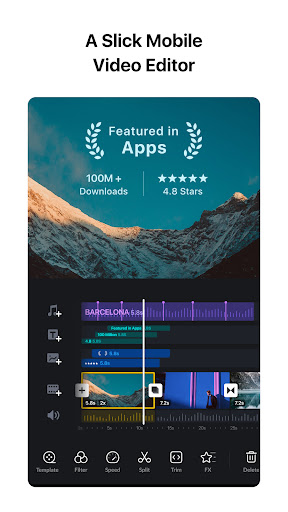
VN is an all-in-one video and photo editor for TikTok, Instagram Reels, YouTube Shorts, and more. Edit on an intuitive multi-track timeline, create beat-synced videos with AutoCut and BeatsClips templates, make photo collages, use AI Kits for creative generation, add auto captions, and export in up to 4K at 60fps.
[AI Kits]
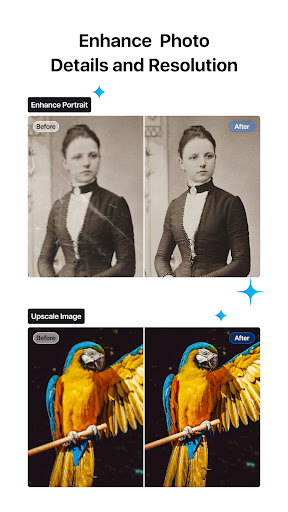
• Enhance Photo. Improve clarity, detail, and overall photo quality with AI.
• Image Generation. Create images from text prompts for thumbnails, covers, and creative assets.
• Video Generation. Generate video clips with AI to kickstart your editing workflow.
[Smart Tools]
• Auto Captions. Automatically generate subtitles from audio—supports multiple languages, subtitle templates, and animated text styles.
• Text-to-Speech. Generate voiceovers for your videos without recording.
• Video/Photo Cutout. Remove backgrounds from videos and photos in one tap.
• Smooth Slow Motion. AI frame interpolation for fluid slow-mo—even when slowing down standard frame rate footage.
[Video Editing]
• Trim & Merge. Cut clips with frame-accurate precision (0.05s) and merge them into a seamless timeline—with up to 30x zoom.
• Overlay. Add overlay videos, photos, stickers, and text on a multi-layer timeline.
• Masks. Apply masks to layers for precise, creative compositions.
• Reverse, Zoom & Freeze Frame. Play clips backward, add zoom motion, or freeze key moments.
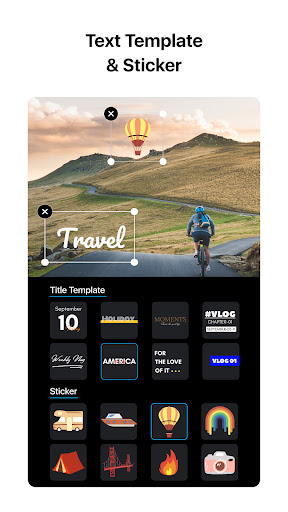
• Add Text & Stickers. Customize text and stickers with keyframe animation.
• Music & Voice-over. Add music, sound effects, and record voice-overs directly in the app.
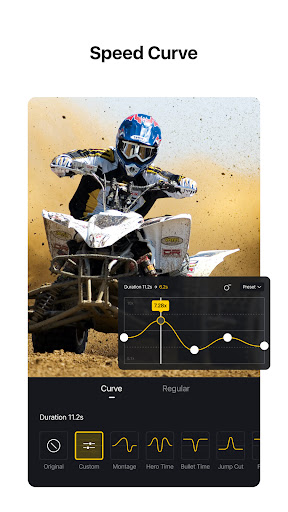
• Speed Control. Speed up or slow down clips with presets or advanced curve-based speed ramps.
• Keyframe Editing. Add custom keyframe animations with 19 built-in effects and adjustable curves.
• Beat Editing. Add markers to sync your clips with music beats.
• Non-destructive Editing. Save drafts anytime with full undo/redo support.
[Quick Create]
• BeatsClips. Generate beat-synced templates from your video or music—use them in templates or with AutoCut.
• AutoCut. Turn your footage into a finished edit automatically—select a BeatsClips template and sync clips to the beat.
• Story. Organize clips along a storyline first, then generate your video.
• Teleprompter. Read your script while recording talking-head videos—stay on track and never lose your flow.
[Filters, Effects & Transitions]
• Cinematic Filters & LUTs. Apply built-in filters or import LUTs for a professional look.
• Transitions & Effects. Smooth transitions and diverse visual effects for polished edits.
[Templates]
• Custom Templates. Create your own templates and reuse them across projects to keep a consistent style and edit faster.
• Platform Templates. A rich library for every scenario—talking videos, Instagram Reels, Instagram Stories, Posts, YouTube videos, TikTok covers, YouTube thumbnails, festivals, business, and more.
[Photo Editing & Collage]
• Photo Editing. Add text and stickers to photos, apply filters, and adjust brightness, contrast, and more.
• Photo Collage Maker. Stitch multiple photos with preset layouts—switch compositions anytime.
• Customize Collages. Add backgrounds, filters, adjustments, text, and stickers to your collage.
[Import & Assets]
• Easy Import. Add media via Wi-Fi, WhatsApp, Telegram, or Zip.
• Asset Library. Access stickers, fonts, filters, LUTs, and more.
[Share & Export]
• High-Quality Export. Export up to 4K resolution at 60fps.
• Secure Mode. Protect drafts with passwords and expiration dates.
• Share to Social Apps. Share to YouTube, Instagram, TikTok, WhatsApp, and more.
Discord: discord.gg/eGFB2BW4uM
YouTube: @vnvideoeditor
Email: vn.support+android@ui.com
Terms: www.ui.com/legal/termsofservice
Privacy: www.ui.com/legal/privacypolicy
Website: www.vlognow.me
[AI Kits]
• Enhance Photo. Improve clarity, detail, and overall photo quality with AI.
• Image Generation. Create images from text prompts for thumbnails, covers, and creative assets.
• Video Generation. Generate video clips with AI to kickstart your editing workflow.
[Smart Tools]
• Auto Captions. Automatically generate subtitles from audio—supports multiple languages, subtitle templates, and animated text styles.
• Text-to-Speech. Generate voiceovers for your videos without recording.
• Video/Photo Cutout. Remove backgrounds from videos and photos in one tap.
• Smooth Slow Motion. AI frame interpolation for fluid slow-mo—even when slowing down standard frame rate footage.
[Video Editing]
• Trim & Merge. Cut clips with frame-accurate precision (0.05s) and merge them into a seamless timeline—with up to 30x zoom.
• Overlay. Add overlay videos, photos, stickers, and text on a multi-layer timeline.
• Masks. Apply masks to layers for precise, creative compositions.
• Reverse, Zoom & Freeze Frame. Play clips backward, add zoom motion, or freeze key moments.
• Add Text & Stickers. Customize text and stickers with keyframe animation.
• Music & Voice-over. Add music, sound effects, and record voice-overs directly in the app.
• Speed Control. Speed up or slow down clips with presets or advanced curve-based speed ramps.
• Keyframe Editing. Add custom keyframe animations with 19 built-in effects and adjustable curves.
• Beat Editing. Add markers to sync your clips with music beats.
• Non-destructive Editing. Save drafts anytime with full undo/redo support.
[Quick Create]
• BeatsClips. Generate beat-synced templates from your video or music—use them in templates or with AutoCut.
• AutoCut. Turn your footage into a finished edit automatically—select a BeatsClips template and sync clips to the beat.
• Story. Organize clips along a storyline first, then generate your video.
• Teleprompter. Read your script while recording talking-head videos—stay on track and never lose your flow.
[Filters, Effects & Transitions]
• Cinematic Filters & LUTs. Apply built-in filters or import LUTs for a professional look.
• Transitions & Effects. Smooth transitions and diverse visual effects for polished edits.
[Templates]
• Custom Templates. Create your own templates and reuse them across projects to keep a consistent style and edit faster.
• Platform Templates. A rich library for every scenario—talking videos, Instagram Reels, Instagram Stories, Posts, YouTube videos, TikTok covers, YouTube thumbnails, festivals, business, and more.
[Photo Editing & Collage]
• Photo Editing. Add text and stickers to photos, apply filters, and adjust brightness, contrast, and more.
• Photo Collage Maker. Stitch multiple photos with preset layouts—switch compositions anytime.
• Customize Collages. Add backgrounds, filters, adjustments, text, and stickers to your collage.
[Import & Assets]
• Easy Import. Add media via Wi-Fi, WhatsApp, Telegram, or Zip.
• Asset Library. Access stickers, fonts, filters, LUTs, and more.
[Share & Export]
• High-Quality Export. Export up to 4K resolution at 60fps.
• Secure Mode. Protect drafts with passwords and expiration dates.
• Share to Social Apps. Share to YouTube, Instagram, TikTok, WhatsApp, and more.
Discord: discord.gg/eGFB2BW4uM
YouTube: @vnvideoeditor
Email: vn.support+android@ui.com
Terms: www.ui.com/legal/termsofservice
Privacy: www.ui.com/legal/privacypolicy
Website: www.vlognow.me
Show more
OTHERS:VIDEO_PLAYERS
What\'s New in Version 1.3.5
Last updated on Jul 30,2026
Minor bug fixes and improvements. Install or update to the newest version to check it out!
Show less
Screen shots
Information
-
Updated2026-07-30
-
Current Version2.17.0
-
Offered By

-
Apk size170.9MB
-
Requires AndroidAndroid 4.4+