Clipboard Support ClipChain
hanamarusha
-
تازہ کاری
2026-08-10
-
موجودہ ورژن
1.45
-
پیشکش بذریعہ

تفصیل
ClipChain is a clipboard manager that automatically records the text you copy and lets you call it up the moment you want to paste.
It also supports a step beyond ordinary copy-paste — saving phrases you use often as templates, pulling out only the part you need from long text, or pasting several texts together at once.
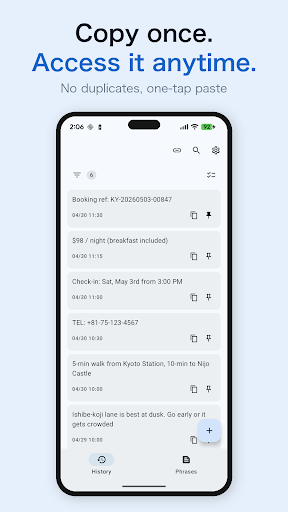
■ Records your copy history automatically
Copied text is saved automatically. Identical content isn't registered twice, so your history stays tidy.
• Find past text instantly with full-text search
• Filter by date or app, and pin your frequently used texts
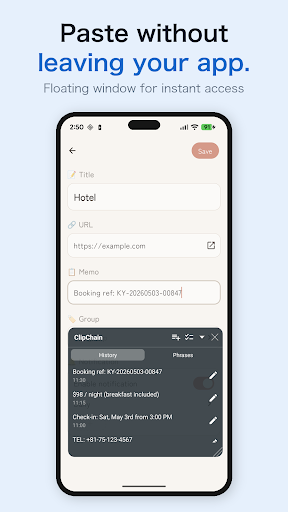
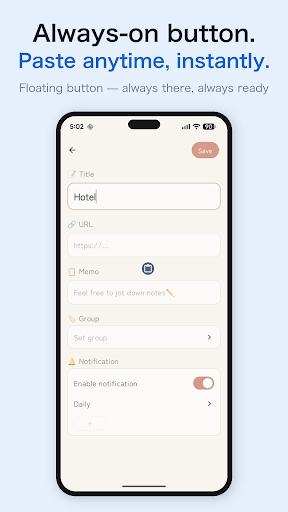
■ One-tap paste right where you are
Paste with a single tap from a small floating window. No long-press needed.
Since you can paste without switching apps, repeated pasting like filling out forms goes smoothly.
■ Save frequently used text as snippets
Organize greetings, addresses and the like into groups and call them up with one tap.
(e.g. Address group, Work group, hashtags for social media)
◆ You can also use it like this!
■ Choose auto-save on or off
Turn auto-save off and you can save only the items you want to keep, manually.
Record your clipboard manually anytime from the button in the notification bar.
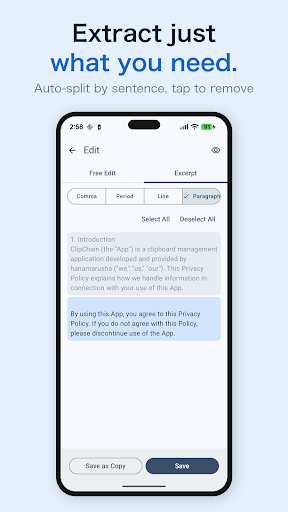
■ Excerpt Mode — pull out just the part you want from long text
Copied long text is automatically split by period, comma, line break, and paragraph.
Just tap to remove the parts you don't need, and quickly extract only the text you want.
Handy when you want to quickly pull just the information you need from long emails, articles, or meeting notes.
■ Combined Paste — paste multiple texts together
Pick the texts you want from your history in order, join them with your preferred separator such as line breaks or spaces, and paste them all at once.
You can freely add and edit separator patterns in the app.
◆ Free vs Pro
Free: All basic features available (with ads)
• 100 saved items
Pro: Unlock the limits and get the most out of it
• Unlimited saved items
• Auto-delete old history
• Backup import
• Auto-minimize the floating window after pasting
• No ads at all
◆ Our commitment to privacy
ClipChain stores all clipboard data only on your device.
◆ About the AccessibilityService API
This app uses the AccessibilityService API.
Its purposes are as follows.
• Automatically saving copied text (recording clipboard history)
• Displaying a floating window for copying and pasting text
No data is collected or shared through this API.
---
Make copy-paste smarter. Change how efficiently you work with text — with ClipChain.
It also supports a step beyond ordinary copy-paste — saving phrases you use often as templates, pulling out only the part you need from long text, or pasting several texts together at once.
■ Records your copy history automatically
Copied text is saved automatically. Identical content isn't registered twice, so your history stays tidy.
• Find past text instantly with full-text search
• Filter by date or app, and pin your frequently used texts
■ One-tap paste right where you are
Paste with a single tap from a small floating window. No long-press needed.
Since you can paste without switching apps, repeated pasting like filling out forms goes smoothly.
■ Save frequently used text as snippets
Organize greetings, addresses and the like into groups and call them up with one tap.
(e.g. Address group, Work group, hashtags for social media)
◆ You can also use it like this!
■ Choose auto-save on or off
Turn auto-save off and you can save only the items you want to keep, manually.
Record your clipboard manually anytime from the button in the notification bar.
■ Excerpt Mode — pull out just the part you want from long text
Copied long text is automatically split by period, comma, line break, and paragraph.
Just tap to remove the parts you don't need, and quickly extract only the text you want.
Handy when you want to quickly pull just the information you need from long emails, articles, or meeting notes.
■ Combined Paste — paste multiple texts together
Pick the texts you want from your history in order, join them with your preferred separator such as line breaks or spaces, and paste them all at once.
You can freely add and edit separator patterns in the app.
◆ Free vs Pro
Free: All basic features available (with ads)
• 100 saved items
Pro: Unlock the limits and get the most out of it
• Unlimited saved items
• Auto-delete old history
• Backup import
• Auto-minimize the floating window after pasting
• No ads at all
◆ Our commitment to privacy
ClipChain stores all clipboard data only on your device.
◆ About the AccessibilityService API
This app uses the AccessibilityService API.
Its purposes are as follows.
• Automatically saving copied text (recording clipboard history)
• Displaying a floating window for copying and pasting text
No data is collected or shared through this API.
---
Make copy-paste smarter. Change how efficiently you work with text — with ClipChain.
مزید دکھائیں
OTHERS:TOOLS
ورژن 1.3.5 میں کیا نیا ہے؟
آخری بار اپ ڈیٹ کیا گیا: Aug 10,2026
چھوٹی بگ فکسز اور بہتریاں۔ نیا ورژن انسٹال یا اپ ڈیٹ کریں تاکہ اس کا جائزہ لے سکیں!
کم دکھائیں
اسکرین شاٹس
معلومات
-
تازہ کاری2026-08-10
-
موجودہ ورژن1.45
-
پیشکش بذریعہ

-
Apk سائز0MB
-
اینڈرائیڈ کی ضرورت ہےAndroid 4.4+