Blue Text - Keyboard + Convert
Shamoil Arsiwala
-
Atualizada
2025-01-13
-
Versão atual
2.1
-
Oferecido por

Description
*TEXT WILL APPEAR BLACK ON KITKAT AND OLDER BASED ROMS*
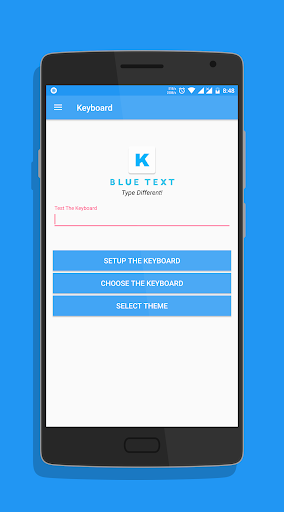
To Enable the Keyboard,
1. Go to Setting
2. Select Language and Input
3. Click on Current Keyboard
4. Click on Choose Keyboard
5. Enable Emoji Letter Keyboard & click on Ok
6. Again click on Current Keyboard and this time your should see the Emoji Letter Keyboard.
Select it and start Typing!
- The Application has a beautiful Light theme & Dark Theme.
- Also send BLANK MESSAGES by selecting the blank key in symbols section.
If you have any doubts or suggestions, Leave them in the review section below
Thank you!
To Enable the Keyboard,
1. Go to Setting
2. Select Language and Input
3. Click on Current Keyboard
4. Click on Choose Keyboard
5. Enable Emoji Letter Keyboard & click on Ok
6. Again click on Current Keyboard and this time your should see the Emoji Letter Keyboard.
Select it and start Typing!
- The Application has a beautiful Light theme & Dark Theme.
- Also send BLANK MESSAGES by selecting the blank key in symbols section.
If you have any doubts or suggestions, Leave them in the review section below
Thank you!
Mostre mais
OTHERS:PERSONALIZATION
O que há de novo na versão 1.3.5
Última atualização em Jan 13,2025
Correções de bugs menores e melhorias. Instale ou atualize para a versão mais recente para conferir!
Mostrar Menos
Capturas de tela
Informação
-
Atualizada2025-01-13
-
Versão atual2.1
-
Oferecido por

-
Tamanho de Apk0MB
-
Requer AndroidAndroid 4.4+

![Color Changer Free [root]](https://dl.memuplay.com/new_market/img/mobi.omegacentauri.red.icon.2024-12-13-07-17-50.png)