
Video Downloader for Pinterest
Video Download Studio
-
Dikemas kini
2026-10-10
-
Versi Semasa
1.9.3
-
Ditawarkan Oleh

Penerangan
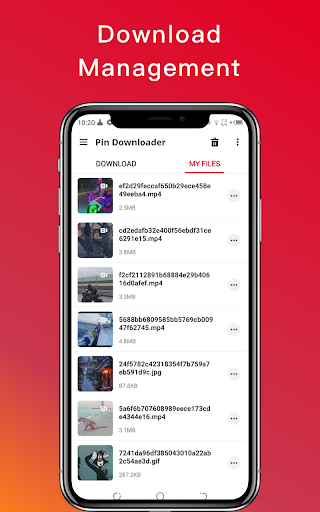
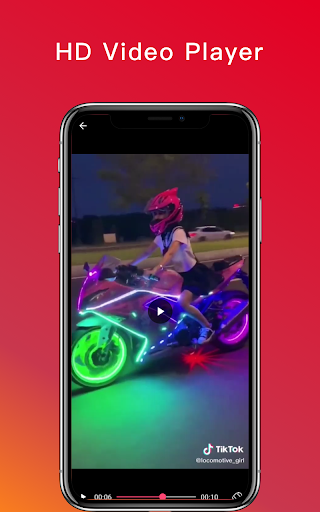
အခမဲ့ Pinterest ဗီဒီယိုဒေါင်းလုဒ်ကိရိယာသည် Pinterest မှ အရည်အသွေးမြင့် ဗီဒီယိုများကို လျင်မြန်စွာ ဒေါင်းလုဒ်လုပ်ရန်၊ Pinterest ဗီဒီယိုများကို အယ်လ်ဘမ်များတွင် သိမ်းဆည်းပြီး ၎င်းတို့ကို အော့ဖ်လိုင်းဖွင့်ရန် ကူညီပေးနိုင်ပါသည်။
Pinterest App အတွက် Video Downloader ကိုအသုံးပြု၍ Pinterest မှဗီဒီယိုဒေါင်းလုဒ်လုပ်ရန်လမ်းညွှန်။
အသုံးပြုပုံ-
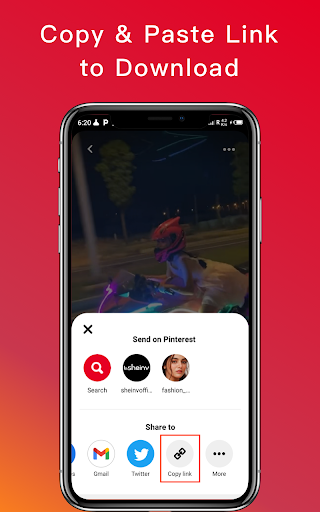
1. “Copy Link” ကိုသုံးပါ
- အဆင့် 1- Pinterest Video ကိုဖွင့်ပြီး သင်စိတ်ဝင်စားသည့်ဗီဒီယို၏ "Copy Link" ကိုနှိပ်ပါ။
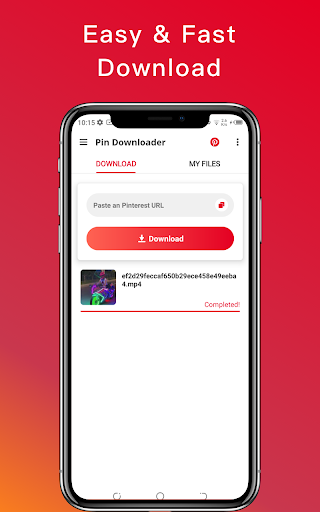
အဆင့် 2- Pinterest Video Downloader ကိုဖွင့်ပါ။
- ပြီးပြီ။ သင့်ဗီဒီယိုကို အလိုအလျောက် ဒေါင်းလုဒ်လုပ်ပါမည်။
2. “Share Link” ကိုသုံးပါ
- အဆင့် 1- Pinterest Video Downloader ကိုဖွင့်ပြီး သင်စိတ်ဝင်စားသော ဓာတ်ပုံ သို့မဟုတ် ဗီဒီယို၏ "Share Link" ကို နှိပ်ပါ။
- အဆင့် 2- မျှဝေရန် Pinterest Video Downloader ကို ရွေးပါ။
- ပြီးပြီ။ သင့်ဗီဒီယိုကို အလိုအလျောက် ဒေါင်းလုဒ်လုပ်ပါမည်။
Pinterest ဗီဒီယိုအတွက်အကောင်းဆုံးဗီဒီယိုဒေါင်းလုပ်ဆွဲ။
ရှင်းလင်းချက်-
* ဗီဒီယို သို့မဟုတ် ဓာတ်ပုံကို ခွင့်ပြုချက်မရှိဘဲ ပြန်လည်တင်ခြင်းမှ ထွက်ပေါ်လာသည့် ဉာဏပစ္စည်းမူပိုင်ခွင့်ချိုးဖောက်မှုအတွက် ကျွန်ုပ်တို့တွင် တာဝန်မရှိပါ။
* ဤအက်ပ်သည် Pinterest နှင့်မသက်ဆိုင်ပါ။
အက်ပ်ကို သင့်အား ကူညီပေးပါက ကြယ် 5 ပွင့် အဆင့်သတ်မှတ်ပါ။
ဒေါင်းလုဒ်ဆွဲခြင်းကို ခံစားလိုက်ပါ။
Pinterest App အတွက် Video Downloader ကိုအသုံးပြု၍ Pinterest မှဗီဒီယိုဒေါင်းလုဒ်လုပ်ရန်လမ်းညွှန်။
အသုံးပြုပုံ-
1. “Copy Link” ကိုသုံးပါ
- အဆင့် 1- Pinterest Video ကိုဖွင့်ပြီး သင်စိတ်ဝင်စားသည့်ဗီဒီယို၏ "Copy Link" ကိုနှိပ်ပါ။
အဆင့် 2- Pinterest Video Downloader ကိုဖွင့်ပါ။
- ပြီးပြီ။ သင့်ဗီဒီယိုကို အလိုအလျောက် ဒေါင်းလုဒ်လုပ်ပါမည်။
2. “Share Link” ကိုသုံးပါ
- အဆင့် 1- Pinterest Video Downloader ကိုဖွင့်ပြီး သင်စိတ်ဝင်စားသော ဓာတ်ပုံ သို့မဟုတ် ဗီဒီယို၏ "Share Link" ကို နှိပ်ပါ။
- အဆင့် 2- မျှဝေရန် Pinterest Video Downloader ကို ရွေးပါ။
- ပြီးပြီ။ သင့်ဗီဒီယိုကို အလိုအလျောက် ဒေါင်းလုဒ်လုပ်ပါမည်။
Pinterest ဗီဒီယိုအတွက်အကောင်းဆုံးဗီဒီယိုဒေါင်းလုပ်ဆွဲ။
ရှင်းလင်းချက်-
* ဗီဒီယို သို့မဟုတ် ဓာတ်ပုံကို ခွင့်ပြုချက်မရှိဘဲ ပြန်လည်တင်ခြင်းမှ ထွက်ပေါ်လာသည့် ဉာဏပစ္စည်းမူပိုင်ခွင့်ချိုးဖောက်မှုအတွက် ကျွန်ုပ်တို့တွင် တာဝန်မရှိပါ။
* ဤအက်ပ်သည် Pinterest နှင့်မသက်ဆိုင်ပါ။
အက်ပ်ကို သင့်အား ကူညီပေးပါက ကြယ် 5 ပွင့် အဆင့်သတ်မှတ်ပါ။
ဒေါင်းလုဒ်ဆွဲခြင်းကို ခံစားလိုက်ပါ။
Tunjukkan Lagi
OTHERS:VIDEO_PLAYERS
Apa yang Baru dalam Versi 1.3.5
Kemaskini terakhir pada Oct 10,2026
Pembaikan pepijat kecil dan penambahbaikan. Pasang atau kemas kini ke versi terbaru untuk mencubanya!
Kurangkan
tangkapan skrin
Maklumat
-
Dikemas kini2026-10-10
-
Versi Semasa1.9.3
-
Ditawarkan Oleh

-
saiz pekej aplikasi0MB
-
Memerlukan AndroidAndroid 4.4+