
Enhanced EQ – Equalizer & Bass
Lelechudz
-
Dikemas kini
2026-05-21
-
Versi Semasa
1.3.0
-
Ditawarkan Oleh

Penerangan
Enhanced EQ — Android အတွက် အစွမ်းထက်ဆုံး system-wide equalizer။
အက်ပ်တစ်ခုတည်းအတွင်းသာ အလုပ်လုပ်သော အခြေခံ equalizer များနှင့်မတူဘဲ၊ Enhanced EQ သည် ဂီတ၊ ဗီဒီယို၊ ဂိမ်းများ၊ ဖုန်းခေါ်ဆိုမှုများ — အက်ပ်တိုင်းတွင် အသံကို အချိန်နှင့်တပြေးညီ လုပ်ဆောင်ပေးသည်။ root မလိုအပ်ပါ။
ပရော်ဖက်ရှင်နယ် အသံညှိစက်
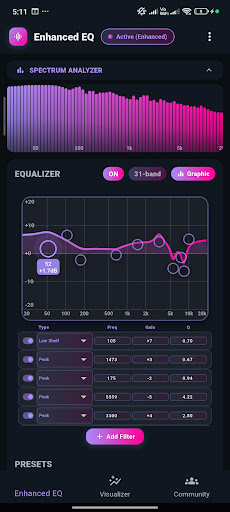
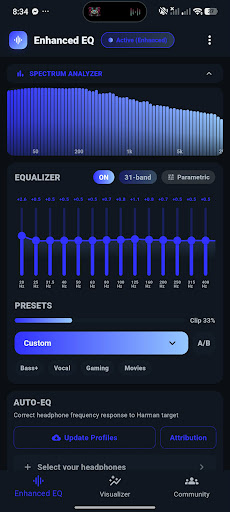
• ၁၀-band၊ ၁၅-band နှင့် ၃၁-band ဂရပ်ဖစ် အသံညှိစက်
• filter အမျိုးအစား ၈ မျိုး (Peak၊ Shelves၊ Notch၊ LR2/LR4၊ All Pass၊ Tilt) ပါဝင်သော Parametric EQ
• Smooth FlowEQ ပုံစံ တိုက်ရိုက်ကြိမ်နှုန်းကွေး overlay
• ကျယ်ပြန့်သော touch target များပါရှိသော VU-meter band slider များ
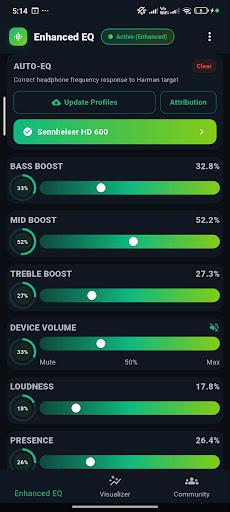
• Bass၊ Treble၊ Mid Boost၊ Loudness၊ Presence၊ Brilliance
• Master Gain နောက်ဆုံးအဆင့် volume slider
• တွဲထားသော sub setup များအတွက် Subwoofer Crossover
• asymmetric ကြားနာမှုအတွက် L/R Balance
• ချိန်ညှိထားသော mode ၇ ခုပါရှိသော Stereo Width၊ Dynamic Compressor
• A/B compare နှင့် Safe Output Guard
AUTO-EQ PROFILES
• built-in headphone correction profiles ၈,၈၅၀+ (Sony၊ Bose၊ Apple၊ Samsung၊ Sennheiser နှင့် အခြား)
• Harman target curve correction
• brand နှင့် type အလိုက် ရှာဖွေပြီး filter လုပ်ပါ (IEM၊ over-ear၊ on-ear)
• custom .wav impulse အတွက် IR Loader response files
PER-APP PROFILES
• foreground app ပေါ်မူတည်ပြီး အလိုအလျောက် EQ profile ကိုပြောင်းပါ
8D & 10D SPATIAL AUDIO
• 8D Spatial Motion
• 10D Cinematic — Cinema, Concert, Surround, Meditation
• Rumble, Punch, Air Enhancement
• Reverb: Room, Hall, Cathedral, Studio, Spring, Shimmer, Gated
SPECTRUM VISUALIZER
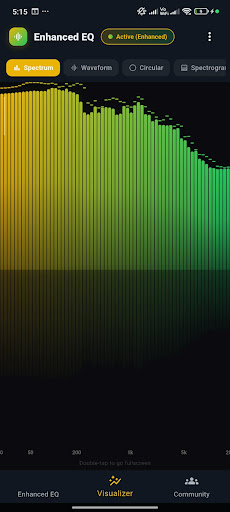
• Visual style ၇ မျိုးပါရှိသော Real-time spectrum analyzer
• Bars, Waveform, Circular, Spectrogram, Terrain, Particle
• HSV spectrum picker ဖြင့် စိတ်ကြိုက် gradient အရောင်များ
• ကိုယ်ပိုင် palettes များကို သိမ်းဆည်းပြီး တစ်ချက်နှိပ်ရုံဖြင့် အသုံးချပါ
• fullscreen view အတွက် နှစ်ချက်နှိပ်ပါ
COMMUNITY PRESETS
• ကမ္ဘာတစ်ဝှမ်းရှိ အသုံးပြုသူများ မျှဝေထားသော EQ presets များကို ကြည့်ရှုပါ
• ကိုယ်ပိုင် presets များကို မျှဝေပါ
• အကောင်းဆုံးအသံထွက် profiles များကို like လုပ်ပြီး download လုပ်ပါ
• tags အလိုက် filter လုပ်ပါ: Bass, Vocal, EDM, Gaming, Movies & အခြားအရာများ
PROFILES & PRESETS
• အကန့်အသတ်မရှိ custom EQ profiles များကို သိမ်းဆည်းပါ
• အလိုအလျောက်အသုံးချပါ output device (နားကြပ်၊ စပီကာ၊ Bluetooth)
• shareable code (EQ64) မှတစ်ဆင့် export နှင့် import လုပ်ပါ
• Bass+၊ Vocal၊ Gaming၊ Movies၊ Classical အပါအဝင် built-in preset ၂၉ ခု
• Cloud sync — profiles + palettes များသည် sign in ဝင်သောအခါ သင့်နောက်သို့ လိုက်ပါသွားသည်
PRO TOOLS
• Test Tones — pink noise + sine sweep အခန်းချိန်ညှိမှုအတွက် sine sweep
• Compressor Modes (Auto၊ Light၊ Punchy၊ Aggressive၊ Brick Wall၊ Voice၊ Mastering)
• Per-App Profiles
• IR Loader
အပြည့်အဝ စိတ်ကြိုက်ပြင်ဆင်နိုင်သည်
• Light နှင့် Dark mode
• gradient accent themes ၁၆+ အပြင် user-save လုပ်ထားသော palettes များ
• HSV spectrum color picker
• Compact density mode
• Start on Boot — EQ သည် အလိုအလျောက် အသက်ဝင်နေပါသည်
ENHANCED EQ PRO
• ကြော်ငြာအားလုံးကို အပြီးအပိုင် ဖယ်ရှားပါ
• advanced processing အားလုံးကို unlock လုပ်ပါ (8D၊ 10D၊ Compressor Modes၊ Reverb၊ Per-App၊ Test Tones၊ IR Loader၊ AutoEQ)
• တစ်ကြိမ်ဝယ်ယူမှု — subscription မလိုပါ
အသုံးပြုနိုင်စွမ်း ဝန်ဆောင်မှု — ENHANCED EQ က ဘာကြောင့် တောင်းဆိုတာလဲ
Per-App Profiles လုပ်ဆောင်ချက်သည် Android ၏ Accessibility Service ကိုအသုံးပြု၍ ရှေ့တွင်ရှိသော အက်ပ်ကို ရှာဖွေပြီး သင်သတ်မှတ်ထားသော EQ ပရိုဖိုင်ကို ထိုအက်ပ်သို့ အလိုအလျောက်အသုံးချနိုင်စေပါသည်။
၎င်းတွင် ဖတ်ရှုရမည့်အချက်များ-
• ရှေ့တွင်ရှိသော အက်ပ်၏ package name သာ (ဥပမာ- "com.spotify.music")။
၎င်းတွင် မဖတ်ရှုရမည့်အချက်များ-
• အသံကို မှတ်တမ်းတင်ခြင်း၊ သိမ်းဆည်းခြင်း သို့မဟုတ် ထုတ်လွှင့်ခြင်း မရှိပါ။
• မျက်နှာပြင်အကြောင်းအရာ၊ မျက်နှာပြင်ပေါ်ရှိ စာသား၊ ကီးဘုတ် သို့မဟုတ် စကားဝှက်များကို ဝင်ရောက်ကြည့်ရှုခြင်း မရှိပါ။
• ကိုယ်ရေးကိုယ်တာအချက်အလက်များကို စုဆောင်းခြင်း၊ မျှဝေခြင်း သို့မဟုတ် ရောင်းချခြင်း မရှိပါ။
package name ကို သင့်စက်တွင်သာ လုပ်ဆောင်ပါသည်။ ဝန်ဆောင်မှုသည် opt-in ဖြစ်သည် — Per-App Profiles မျက်နှာပြင်မှ ၎င်းကိုဖွင့်ပြီး အခြားအင်္ဂါရပ်များကို မထိခိုက်စေဘဲ Per-App Profiles ကို ချက်ချင်းရပ်တန့်ရန် Android Settings → Accessibility တွင် အချိန်မရွေး ပိတ်ပါ။
Enhanced EQ သည် သင်မည်သည့်အက်ပ်တွင်ရှိနေပါစေ သင့်အသံကို ချိန်ညှိနေစေရန်အတွက် အမြဲတမ်း ရှေ့တွင်ရှိသော ဝန်ဆောင်မှုအဖြစ် လုပ်ဆောင်ပါသည်။
Enhanced EQ ကို ဒေါင်းလုဒ်လုပ်ပြီး ကွာခြားချက်ကို နားထောင်ပါ။
အက်ပ်တစ်ခုတည်းအတွင်းသာ အလုပ်လုပ်သော အခြေခံ equalizer များနှင့်မတူဘဲ၊ Enhanced EQ သည် ဂီတ၊ ဗီဒီယို၊ ဂိမ်းများ၊ ဖုန်းခေါ်ဆိုမှုများ — အက်ပ်တိုင်းတွင် အသံကို အချိန်နှင့်တပြေးညီ လုပ်ဆောင်ပေးသည်။ root မလိုအပ်ပါ။
ပရော်ဖက်ရှင်နယ် အသံညှိစက်
• ၁၀-band၊ ၁၅-band နှင့် ၃၁-band ဂရပ်ဖစ် အသံညှိစက်
• filter အမျိုးအစား ၈ မျိုး (Peak၊ Shelves၊ Notch၊ LR2/LR4၊ All Pass၊ Tilt) ပါဝင်သော Parametric EQ
• Smooth FlowEQ ပုံစံ တိုက်ရိုက်ကြိမ်နှုန်းကွေး overlay
• ကျယ်ပြန့်သော touch target များပါရှိသော VU-meter band slider များ
• Bass၊ Treble၊ Mid Boost၊ Loudness၊ Presence၊ Brilliance
• Master Gain နောက်ဆုံးအဆင့် volume slider
• တွဲထားသော sub setup များအတွက် Subwoofer Crossover
• asymmetric ကြားနာမှုအတွက် L/R Balance
• ချိန်ညှိထားသော mode ၇ ခုပါရှိသော Stereo Width၊ Dynamic Compressor
• A/B compare နှင့် Safe Output Guard
AUTO-EQ PROFILES
• built-in headphone correction profiles ၈,၈၅၀+ (Sony၊ Bose၊ Apple၊ Samsung၊ Sennheiser နှင့် အခြား)
• Harman target curve correction
• brand နှင့် type အလိုက် ရှာဖွေပြီး filter လုပ်ပါ (IEM၊ over-ear၊ on-ear)
• custom .wav impulse အတွက် IR Loader response files
PER-APP PROFILES
• foreground app ပေါ်မူတည်ပြီး အလိုအလျောက် EQ profile ကိုပြောင်းပါ
8D & 10D SPATIAL AUDIO
• 8D Spatial Motion
• 10D Cinematic — Cinema, Concert, Surround, Meditation
• Rumble, Punch, Air Enhancement
• Reverb: Room, Hall, Cathedral, Studio, Spring, Shimmer, Gated
SPECTRUM VISUALIZER
• Visual style ၇ မျိုးပါရှိသော Real-time spectrum analyzer
• Bars, Waveform, Circular, Spectrogram, Terrain, Particle
• HSV spectrum picker ဖြင့် စိတ်ကြိုက် gradient အရောင်များ
• ကိုယ်ပိုင် palettes များကို သိမ်းဆည်းပြီး တစ်ချက်နှိပ်ရုံဖြင့် အသုံးချပါ
• fullscreen view အတွက် နှစ်ချက်နှိပ်ပါ
COMMUNITY PRESETS
• ကမ္ဘာတစ်ဝှမ်းရှိ အသုံးပြုသူများ မျှဝေထားသော EQ presets များကို ကြည့်ရှုပါ
• ကိုယ်ပိုင် presets များကို မျှဝေပါ
• အကောင်းဆုံးအသံထွက် profiles များကို like လုပ်ပြီး download လုပ်ပါ
• tags အလိုက် filter လုပ်ပါ: Bass, Vocal, EDM, Gaming, Movies & အခြားအရာများ
PROFILES & PRESETS
• အကန့်အသတ်မရှိ custom EQ profiles များကို သိမ်းဆည်းပါ
• အလိုအလျောက်အသုံးချပါ output device (နားကြပ်၊ စပီကာ၊ Bluetooth)
• shareable code (EQ64) မှတစ်ဆင့် export နှင့် import လုပ်ပါ
• Bass+၊ Vocal၊ Gaming၊ Movies၊ Classical အပါအဝင် built-in preset ၂၉ ခု
• Cloud sync — profiles + palettes များသည် sign in ဝင်သောအခါ သင့်နောက်သို့ လိုက်ပါသွားသည်
PRO TOOLS
• Test Tones — pink noise + sine sweep အခန်းချိန်ညှိမှုအတွက် sine sweep
• Compressor Modes (Auto၊ Light၊ Punchy၊ Aggressive၊ Brick Wall၊ Voice၊ Mastering)
• Per-App Profiles
• IR Loader
အပြည့်အဝ စိတ်ကြိုက်ပြင်ဆင်နိုင်သည်
• Light နှင့် Dark mode
• gradient accent themes ၁၆+ အပြင် user-save လုပ်ထားသော palettes များ
• HSV spectrum color picker
• Compact density mode
• Start on Boot — EQ သည် အလိုအလျောက် အသက်ဝင်နေပါသည်
ENHANCED EQ PRO
• ကြော်ငြာအားလုံးကို အပြီးအပိုင် ဖယ်ရှားပါ
• advanced processing အားလုံးကို unlock လုပ်ပါ (8D၊ 10D၊ Compressor Modes၊ Reverb၊ Per-App၊ Test Tones၊ IR Loader၊ AutoEQ)
• တစ်ကြိမ်ဝယ်ယူမှု — subscription မလိုပါ
အသုံးပြုနိုင်စွမ်း ဝန်ဆောင်မှု — ENHANCED EQ က ဘာကြောင့် တောင်းဆိုတာလဲ
Per-App Profiles လုပ်ဆောင်ချက်သည် Android ၏ Accessibility Service ကိုအသုံးပြု၍ ရှေ့တွင်ရှိသော အက်ပ်ကို ရှာဖွေပြီး သင်သတ်မှတ်ထားသော EQ ပရိုဖိုင်ကို ထိုအက်ပ်သို့ အလိုအလျောက်အသုံးချနိုင်စေပါသည်။
၎င်းတွင် ဖတ်ရှုရမည့်အချက်များ-
• ရှေ့တွင်ရှိသော အက်ပ်၏ package name သာ (ဥပမာ- "com.spotify.music")။
၎င်းတွင် မဖတ်ရှုရမည့်အချက်များ-
• အသံကို မှတ်တမ်းတင်ခြင်း၊ သိမ်းဆည်းခြင်း သို့မဟုတ် ထုတ်လွှင့်ခြင်း မရှိပါ။
• မျက်နှာပြင်အကြောင်းအရာ၊ မျက်နှာပြင်ပေါ်ရှိ စာသား၊ ကီးဘုတ် သို့မဟုတ် စကားဝှက်များကို ဝင်ရောက်ကြည့်ရှုခြင်း မရှိပါ။
• ကိုယ်ရေးကိုယ်တာအချက်အလက်များကို စုဆောင်းခြင်း၊ မျှဝေခြင်း သို့မဟုတ် ရောင်းချခြင်း မရှိပါ။
package name ကို သင့်စက်တွင်သာ လုပ်ဆောင်ပါသည်။ ဝန်ဆောင်မှုသည် opt-in ဖြစ်သည် — Per-App Profiles မျက်နှာပြင်မှ ၎င်းကိုဖွင့်ပြီး အခြားအင်္ဂါရပ်များကို မထိခိုက်စေဘဲ Per-App Profiles ကို ချက်ချင်းရပ်တန့်ရန် Android Settings → Accessibility တွင် အချိန်မရွေး ပိတ်ပါ။
Enhanced EQ သည် သင်မည်သည့်အက်ပ်တွင်ရှိနေပါစေ သင့်အသံကို ချိန်ညှိနေစေရန်အတွက် အမြဲတမ်း ရှေ့တွင်ရှိသော ဝန်ဆောင်မှုအဖြစ် လုပ်ဆောင်ပါသည်။
Enhanced EQ ကို ဒေါင်းလုဒ်လုပ်ပြီး ကွာခြားချက်ကို နားထောင်ပါ။
Tunjukkan Lagi
OTHERS:MUSIC_AND_AUDIO
Apa yang Baru dalam Versi 1.3.5
Kemaskini terakhir pada May 21,2026
Pembaikan pepijat kecil dan penambahbaikan. Pasang atau kemas kini ke versi terbaru untuk mencubanya!
Kurangkan
tangkapan skrin
Maklumat
-
Dikemas kini2026-05-21
-
Versi Semasa1.3.0
-
Ditawarkan Oleh

-
saiz pekej aplikasi0MB
-
Memerlukan AndroidAndroid 4.4+